BoardHawk
New · UK, Europe, US and Canada

BoardHawk Post Helper.
Post a truck in seconds.

The Post a truck part of BoardHawk, on its own, for Amazon Relay carriers in the UK, across Europe, in the United States and in Canada. Press Post a truck on any load card and the form is already filled in from that load. No refresher, no booking, no auto-book – just faster posts.

Chrome or Microsoft Edge on a computer · No card needed · Its own key and trial, separate from BoardHawk

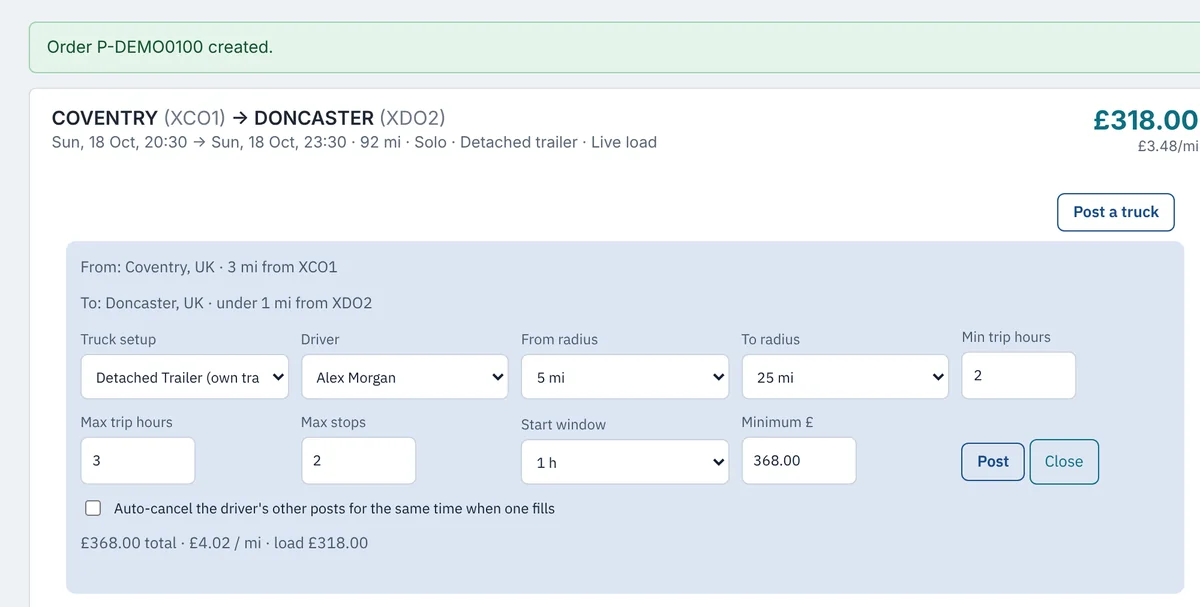
BoardHawk Post Helper on a demo load board: the Post a truck form opened under a Coventry to Doncaster load card, filled in with Relay's towns, radius, trip hours, start window and a minimum price of £368
Demo board: the form filled in from the load. Made-up data.
Just Post a truckPost from any card, see every open post in one list, repeat a post on other days, and put a driver on a booked trip. Nothing else runs.
Learns Relay's own formatIt switches on after you make one post yourself in Relay's own form – and copies exactly what Relay's page sends. If Relay changes, it learns again.
Works where Relay doesUK, Germany, France, Spain, Italy, Poland, Czechia (and the rest of Relay's EU network), the US and Canada – in miles or kilometres, in your currency.
How it works

Ready after one post of your own

The Post Helper adds a slim bar to the bottom of your Relay load board and a Post a truck button to every load card.

Download and add it to your browser

Unzip the download, switch on Developer mode in Chrome or Edge and load the folder – the same steps as in our install guide.

Start your free trial

Open your Relay load board. The Post Helper's Licence box asks for your name and e-mail. Seven days, up to three browsers, no card.

Make one post yourself in Relay

Use Relay's own Post a truck form once. The Post Helper copies Relay's exact request from it and switches Post a truck on. Assign one driver on Relay's Trips page and Assign in Relay switches on too.

What it does

Post a truck without the typing

The form fills itself in from the load

  • From and to are the towns from Relay's own town list nearest the load's first and last stop, with how far each is from the site.
  • The radius is the smallest of Relay's own choices that still covers the stop – at least the radius you set.
  • Trip hours, stops and the start window come from the load. The minimum price is the load's price plus the margin you choose.
  • Pick the truck setup and the driver – both straight from your Relay account – check, and press Post. If a post for the same driver and time is already open, you can link the new one to it.
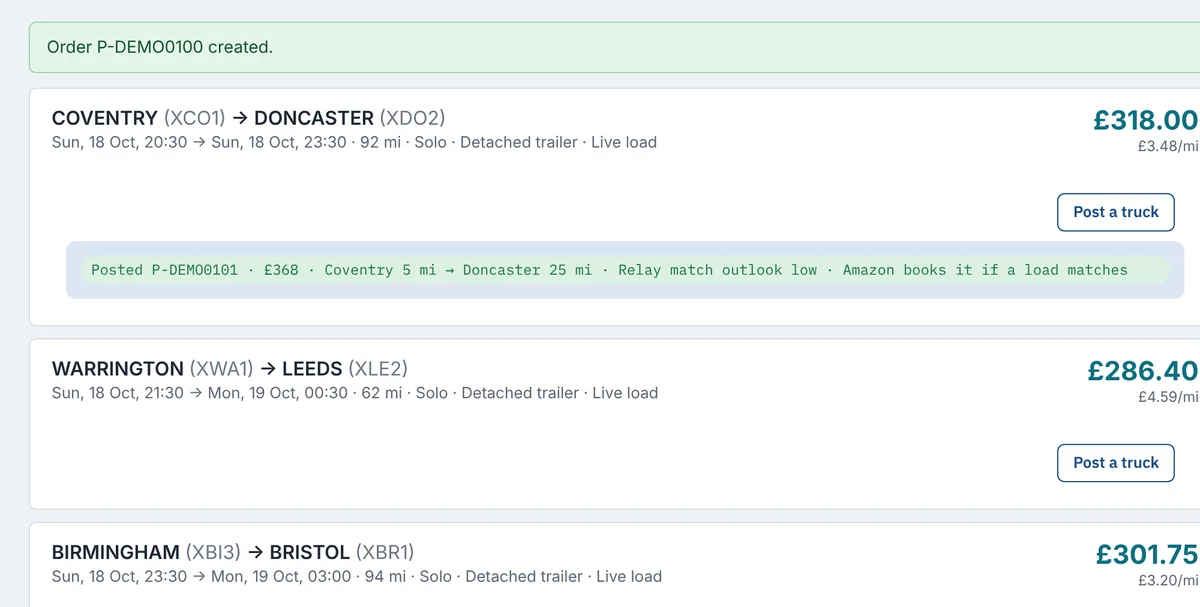
The load card after posting: Posted P-DEMO0101, £368, Coventry 5 mi to Doncaster 25 mi, Relay match outlook low, Amazon books it if a load matches
Posted, with Relay's match outlook, right on the card.

It learns from your own post – and learns again if Relay changes

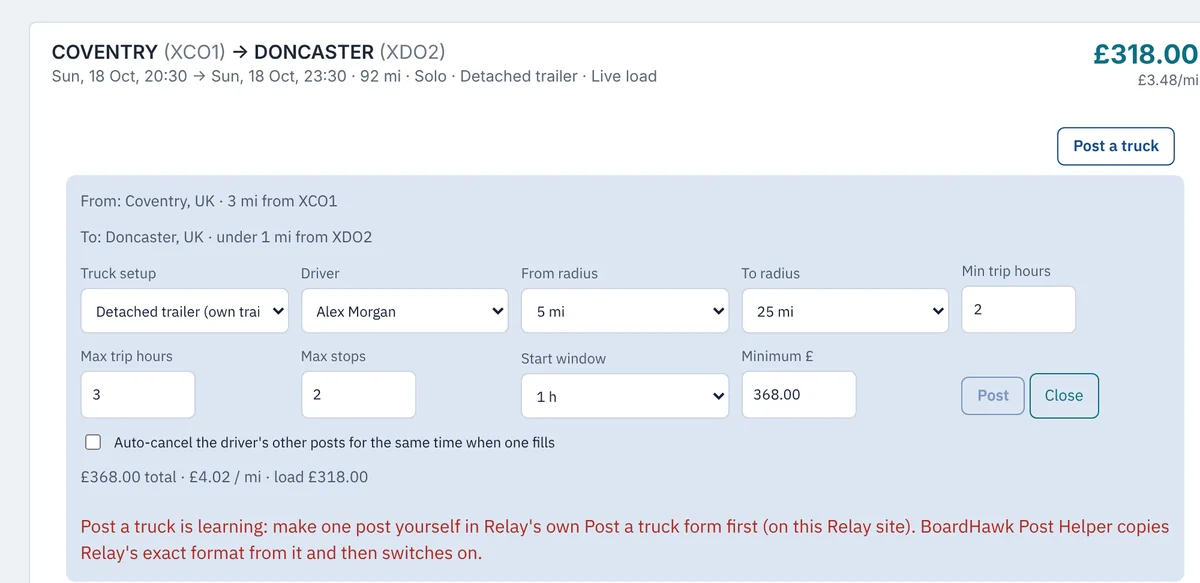
  • Until it has seen one post you made in Relay's own Post a truck form on that Relay site, Post a truck stays off and says so.
  • When Relay accepts your post, the Post Helper keeps a copy of the exact request Relay's page sent – every field, in Relay's order, in Relay's units. Each post it makes has exactly those fields; only the load's own details change.
  • Assign in Relay works the same way: assign one driver yourself on Relay's Trips page, and the Post Helper copies those requests.
  • If Relay refuses twice in a row in a way that looks like a change on Relay's side, that part goes back to learning by itself. Make one more by hand and it's back on. Settings also has a Learn again button.
The Post a truck form before learning: a red note says Post a truck is learning, make one post yourself in Relay's own Post a truck form first, and the Post button is greyed out
Before the first post of your own: nothing is sent.

Your country, your units

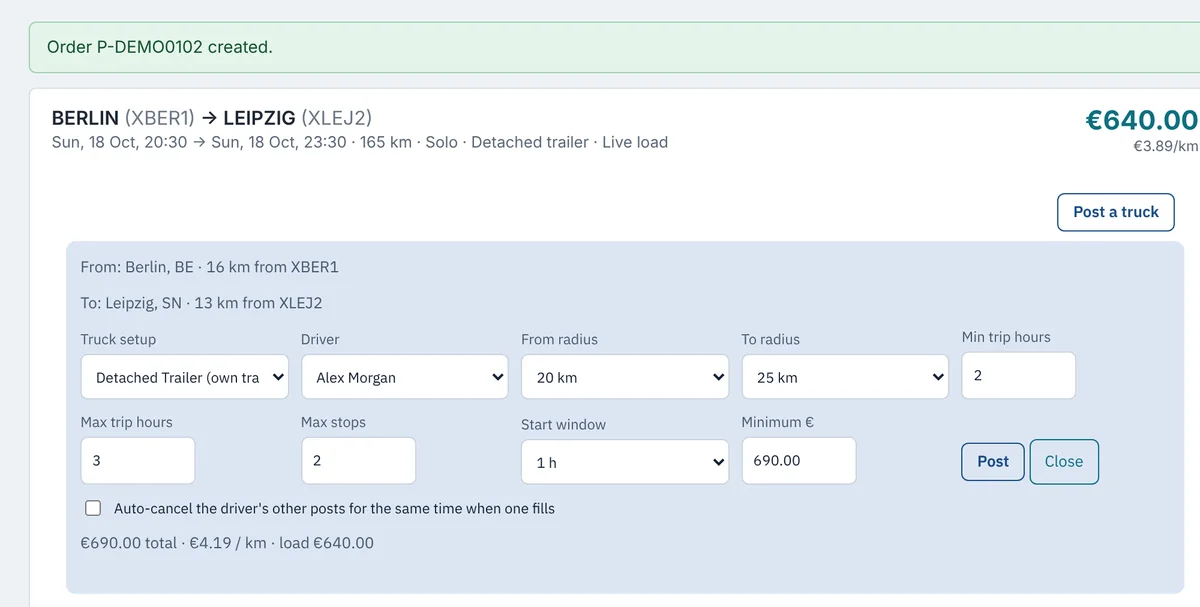
  • The Post Helper reads which Relay market you're on from Relay's own page, and posts in the units Relay's own form uses there: miles in the UK, US and Canada, kilometres everywhere else, in your account's currency.
  • Radius choices come from Relay's own Post a truck settings for your board.
  • Outside the UK, it only ever posts with a town from Relay's own town list – never a guessed one.
The Post a truck form on a demo German board: Berlin to Leipzig, radius 20 km and 25 km, minimum price €690.00, €4.19 per km
A demo German board: kilometres and euros.

All your posts in one place

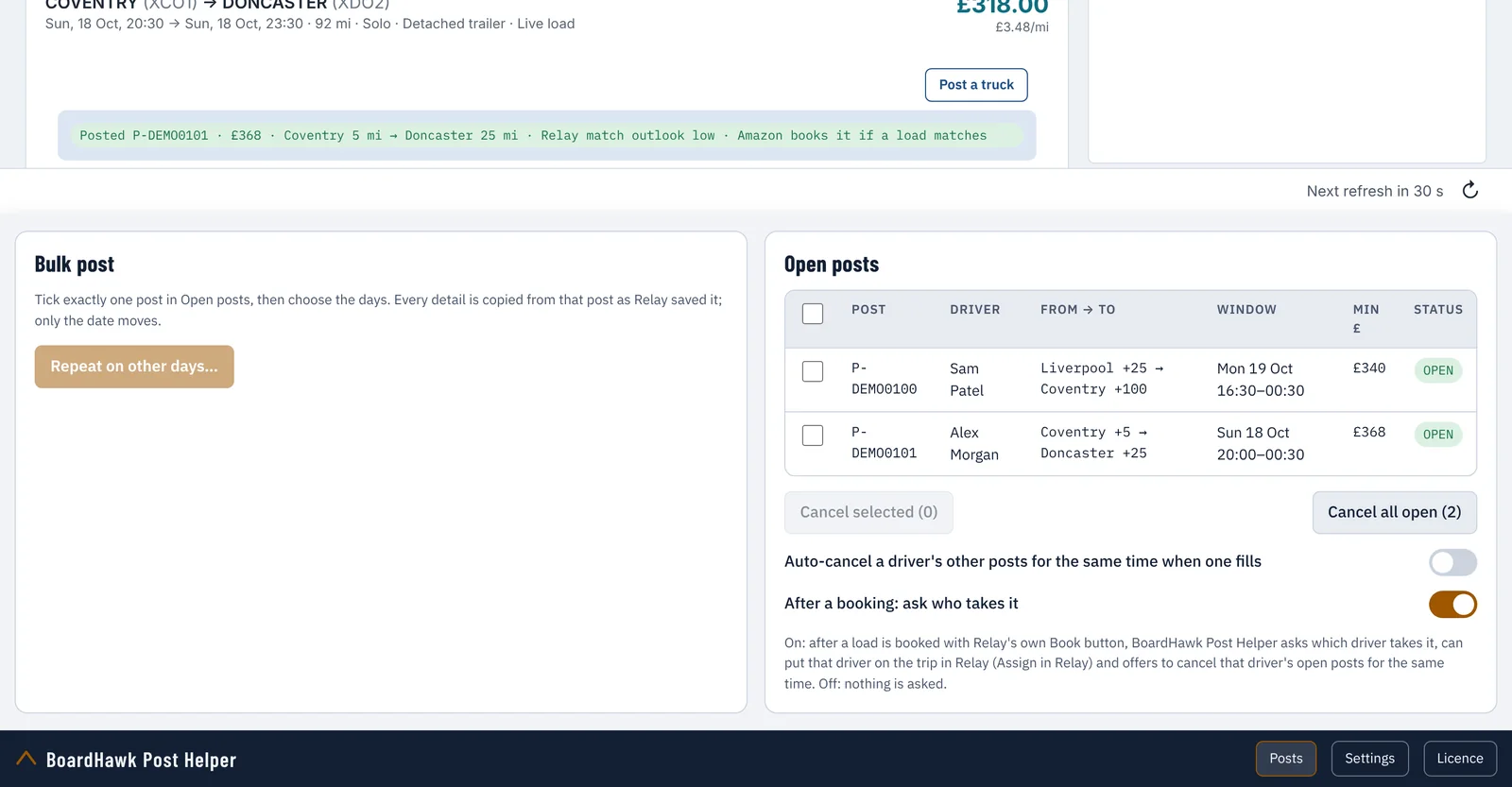
  • Every open post under Posts, with its driver, towns, time window and minimum price. Cancel the ones you tick.
  • Repeat a post on other days: tick the days, check what will be sent, post them one by one.
  • Auto-cancel: when one of a driver's posts fills, their other open posts for the same time are cancelled.
  • Limits you set for open posts per driver and in total are never passed.
The Posts sheet: open posts with driver, from and to, window and minimum price, cancel ticked posts, and Repeat on other days
Posts: cancel, repeat, auto-cancel.

After a booking: who takes it?

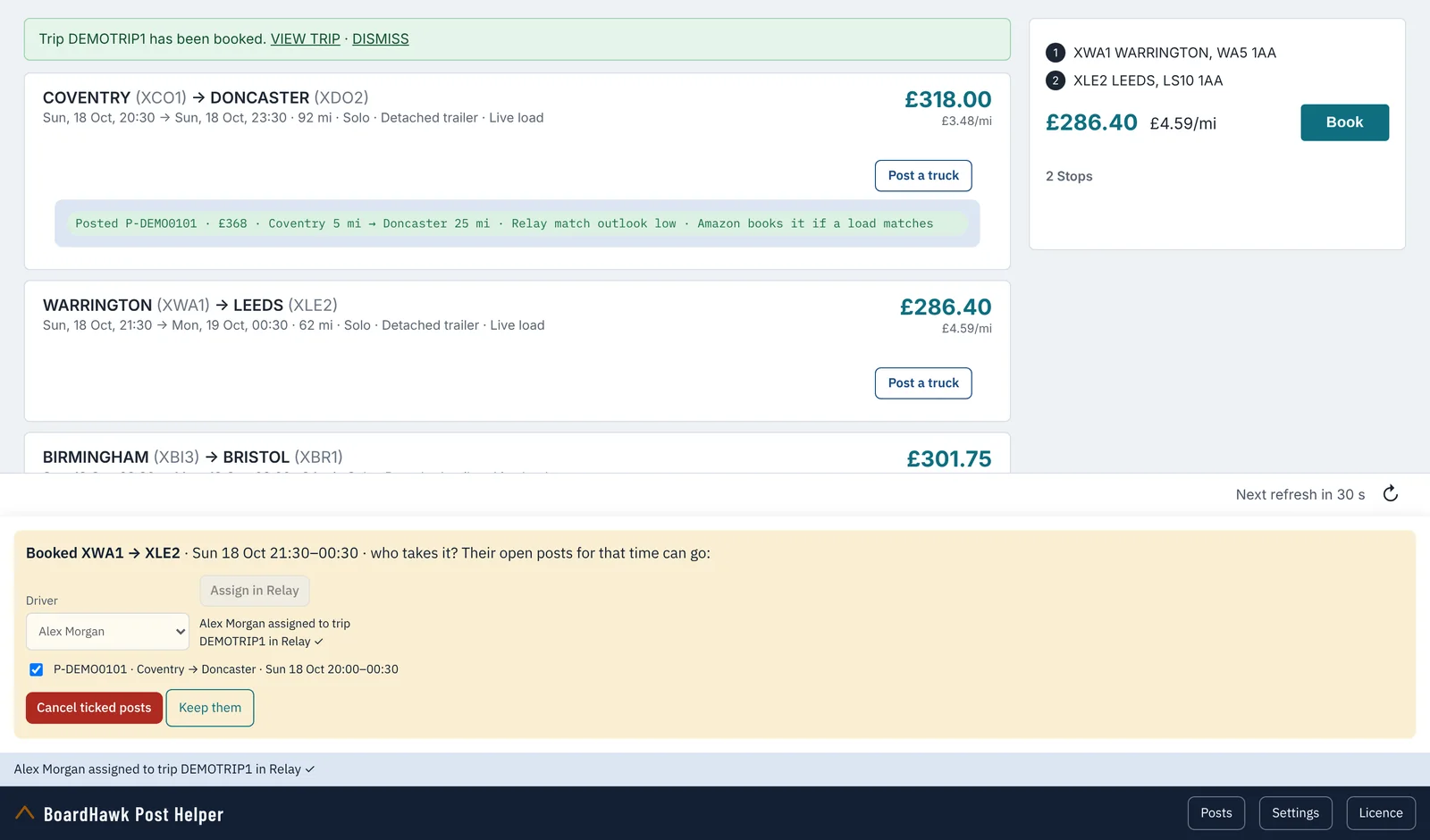
  • Book a load with Relay's own Book button as usual. With Ask who takes it switched on, the Post Helper asks which driver takes the load.
  • Assign in Relay puts that driver on the trip in Relay for you.
  • The driver's open posts for the same time are listed, ticked, ready to cancel – nothing is cancelled until you press the button.
After a booking made with Relay's own Book button: the Post Helper asks who takes it, Alex Morgan has been assigned to trip DEMOTRIP1 in Relay, and his overlapping post is ticked to cancel
Driver assigned in Relay, overlapping post ready to cancel. Made-up names.
Where it works

Relay load boards it runs on

CountryRelay siteDistances
United Kingdomrelay.amazon.co.ukmiles
Germanyrelay.amazon.dekilometres
Francerelay.amazon.frkilometres
Spainrelay.amazon.eskilometres
Italyrelay.amazon.itkilometres
Polandrelay.amazon.plkilometres
Czechiarelay.amazon.czkilometres
United Statesrelay.amazon.commiles
Canadarelay.amazon.camiles

Relay's EU network also covers loads in Belgium, the Netherlands and Luxembourg; carriers there use one of the EU Relay sites above. Each Relay site learns from its own first post.

Which one?

BoardHawk or the Post Helper

BoardHawkBoardHawk Post Helper
Relay load boardsUKUK, Europe, US, Canada
Refresh the board, filters and soundsYesNo
ACCEPT, Instant Book and auto-bookYesNo
Post a truck from any cardYesYes
Open posts, cancel, repeat on other days, auto-cancelYesYes
After a booking: assign the driver in RelayYesYes
Key and free trialIts ownIts own

Each product has its own key and its own 7-day trial – a BoardHawk key doesn't run the Post Helper, and the other way round. More about BoardHawk →

See it working

Post Helper videos

Two-minute walkthroughs and 30-second versions, on demo boards with made-up loads.

BoardHawk Post Helper – post a truck on Amazon Relay in seconds

This is the BoardHawk Post Helper, a browser extension for Amazon Relay carriers. It does one job: posting trucks, faster. No refresher, no booking, no auto-book. Just Post a truck, and your posts in one place.

30-second version (vertical) · 2:00 · BoardHawk Post Helper

Chapters
  • 0:00 Meet the Post Helper
  • 0:19 It learns from your post
  • 0:31 One post in Relay's own form
  • 0:46 Post a truck from any card
  • 1:01 Posted, right on the card
  • 1:15 Europe, the US and Canada
  • 1:31 Your posts in one place
Transcript

This is the BoardHawk Post Helper, a browser extension for Amazon Relay carriers.

It does one job: posting trucks, faster.

No refresher, no booking, no auto-book. Just Post a truck, and your posts in one place.

Before it posts anything, it learns Relay's own format.

Until then, Post a truck stays off, and tells you what to do.

Make one post yourself, in Relay's own Post a truck form.

When Relay accepts it, the Post Helper copies that exact request: every field, in Relay's order.

Now press Post a truck on any card. The form opens, filled in from that load.

Relay's own towns, the radius, trip hours, start window, and your minimum price.

Press Post, and it's done. The card shows the post number, the towns, and Relay's match outlook.

If a load matches, Amazon books it for you, as with any Relay post.

It works on Relay's boards in the UK, across Europe, in the US and in Canada.

Here, on a German board, it's kilometres and euros, with Relay's own radius choices.

Every open post sits under Posts. Cancel the ones you tick, or repeat a post on other days.

Book a load with Relay's own Book button, and it can ask who takes it,

put that driver on the trip in Relay,

and cancel their other posts for the same time.

BoardHawk Post Helper. Free seven-day trial at showmyplane.com.

Install the BoardHawk Post Helper and switch it on

Here's how to install the BoardHawk Post Helper in Chrome or Edge, and switch it on. On showmyplane.com, open the Post Helper page, and tick the box to accept the disclaimer and terms, then press Download.

30-second version (vertical) · 2:00 · Install and switch on

Chapters
  • 0:00 Download the Post Helper
  • 0:17 Unzip it into a folder you keep
  • 0:28 Developer mode, then Load unpacked
  • 0:43 Start your free trial
  • 1:03 Now it learns
  • 1:13 One post in Relay's form
  • 1:24 Assign in Relay, the same way
  • 1:36 If Relay changes
Transcript

Here's how to install the BoardHawk Post Helper in Chrome or Edge, and switch it on.

On showmyplane.com, open the Post Helper page, and tick the box to accept the disclaimer and terms,

then press Download.

Right-click the zip, choose Extract All, and pick a folder you'll keep.

Your browser runs it from that folder, so don't delete it.

Open your browser's extensions page, and switch on Developer mode.

Press Load unpacked, and choose the folder with manifest.json in it.

The Post Helper is in.

Open your Relay load board, and sign in as usual.

The Post Helper's Licence box opens by itself. Type your name and e-mail, tick the box, and start your trial.

Seven days, up to three browsers, no card. It's separate from a BoardHawk trial.

Press Post a truck on a card, and you'll see it's still learning.

It never makes up a request. It copies Relay's own.

So make one real post yourself, in Relay's own Post a truck form.

When Relay accepts it, Post a truck switches on.

Then assign one driver yourself on Relay's Trips page.

The Post Helper copies those requests, and Assign in Relay switches on too.

Settings shows both parts.

If Amazon changes Relay, and two posts in a row are refused, that part goes back to learning by itself.

Make one more by hand, and it's back. There's a Learn again button, too.

The step-by-step guide is at showmyplane.com.

Post a truck on Amazon Relay in Europe, the US and Canada

The Post Helper works on Relay's load boards in the UK, Germany, France, Spain, Italy, Poland and Czechia, and in the US and Canada. Belgium, the Netherlands and Luxembourg are covered by Relay's EU network, through the EU Relay sites. It reads which market you're on from Relay's own page.

30-second version (vertical) · 2:00 · Europe, the US and Canada

Chapters
  • 0:00 Your country, your units
  • 0:22 Each site learns
  • 0:35 Kilometres and euros
  • 0:58 Posted in Relay's format
  • 1:27 Posts on every board
Transcript

The Post Helper works on Relay's load boards in the UK, Germany, France, Spain, Italy, Poland and Czechia, and in the US and Canada.

Belgium, the Netherlands and Luxembourg are covered by Relay's EU network, through the EU Relay sites.

It reads which market you're on from Relay's own page.

Each Relay site learns from its own first post. So make one post in Relay's own form on that site.

Until then, Post a truck stays off on that site, and says so.

On a European board, everything is in kilometres, in your account's currency.

From and to are towns from Relay's own town list. Outside the UK, it never guesses a town.

The radius choices come from Relay's own Post a truck settings.

The minimum price starts at the load's price, plus your margin.

Press Post, and it goes to Relay in exactly the format Relay's own form uses.

In the US and Canada, Relay works in miles, so the Post Helper does too. In dollars, here.

The towns come from Relay's own list for that board, with how far each one is from the site.

And again, Relay's own radius choices.

Posted.

Your open posts show under Posts on each board, ready to cancel, or to repeat on other days.

Set your margin, minimum radius, start window and post limits once, in Settings.

The radius is in your board's own unit.

And if Relay changes, Post a truck learns again from your next post, on its own.

BoardHawk Post Helper. Free seven-day trial at showmyplane.com.

Free 7-day trial

Download BoardHawk Post Helper

Version 1.0.0 for Google Chrome and Microsoft Edge. Unzip it, load it in your browser (the install guide shows how – the steps are the same), open your Relay load board and start your trial from the Post Helper's Licence box.

Download the Post Helper (.zip)

Free trial: 7 days · up to 3 browsers · one Relay company account

Before you download

  • The Post Helper is independent software. It is not made by, endorsed by or connected with Amazon.
  • Posts it makes are real posts on your Relay account. When Relay matches a load to one, Amazon books it for you – you're responsible for covering it.
  • You're responsible for using Amazon Relay within Amazon's own terms and programme policies. Amazon can change its website at any time; the Post Helper then learns again from your next post.
  • The trial asks for your name and e-mail, kept only to manage your key. See privacy.

After the trial, ask for a key at contact@showmyplane.com.

Questions

Post Helper questions

Is the BoardHawk Post Helper made by Amazon?

No. It's independent software that works on the Amazon Relay load board in your own signed-in browser. It isn't made by, endorsed by or connected with Amazon.

Why do I have to make one post myself first?

The Post Helper never makes up a request. It copies the one Relay's own Post a truck form sends when you post – every field, in Relay's order, in Relay's units – and uses that shape for its own posts, changing only the load's details. Relay can be a little different in each country, so each Relay site learns from its own first post.

What happens if Amazon changes Relay?

If Relay refuses two of the Post Helper's posts in a row in a way that looks like a change on Relay's side, Post a truck switches itself back to learning and tells you. Make one more post yourself in Relay's form and it's on again. The same goes for Assign in Relay and the Trips page. You can also press Learn again in Settings at any time.

Does it refresh the board or book loads?

No. The Post Helper has no refresher, no ACCEPT button, no Instant Book and no auto-book. It only posts trucks and helps you manage your posts. For refreshing and booking on the UK board, there's BoardHawk.

Which countries does it work in?

Relay's load boards in the United Kingdom, Germany, France, Spain, Italy, Poland and Czechia (Relay's EU network also covers Belgium, the Netherlands and Luxembourg), the United States and Canada.

Can I use my BoardHawk key?

No – each product has its own key and its own free trial. You can try both.

What does it keep about me?

Your settings, your key, and the copies of Relay's requests it learned from your own post and assignment stay in your browser. Our licence server only checks your key; for a trial it keeps the name and e-mail you type in. It never receives your loads, posts, prices or drivers. See privacy.